Getting Started
Signing in
Eidon supports four ways to sign in: a local username/password account, SAML 2.0 single sign-on, OpenID Connect (OIDC/OAuth2) with providers like Entra ID, Okta, Google, Auth0 and Keycloak, and LDAP/Active Directory. If your organisation has SSO enabled, the login page offers the relevant button (or redirects automatically for SAML) — append "?local=1" to the login URL to reach the local username/password form instead (useful for admin accounts). A workspace can require multi-factor authentication for local accounts (Settings → Security), in which case a TOTP code is requested after the password on every sign-in.
Roles & permissions
Every account has one of three base roles. Admin: full access, including Settings, user management, API keys and backups. Editor: can create, edit and delete catalog data (applications, capabilities, decisions, solution designs, engagements, etc.) but cannot access Settings. Viewer: read-only across all data, but can still manage their own notification subscriptions, mark notifications read, and comment. Roles are enforced both in the UI (hiding actions/tabs/nav items) and independently on the backend, so a viewer account can never mutate data even by calling the API directly. On workspaces with the custom-roles feature entitled, admins can additionally define named roles with a fine-grained set of capability checkboxes layered on top of this base model — useful when "editor" is either too broad or too narrow for a given team.
Navigation
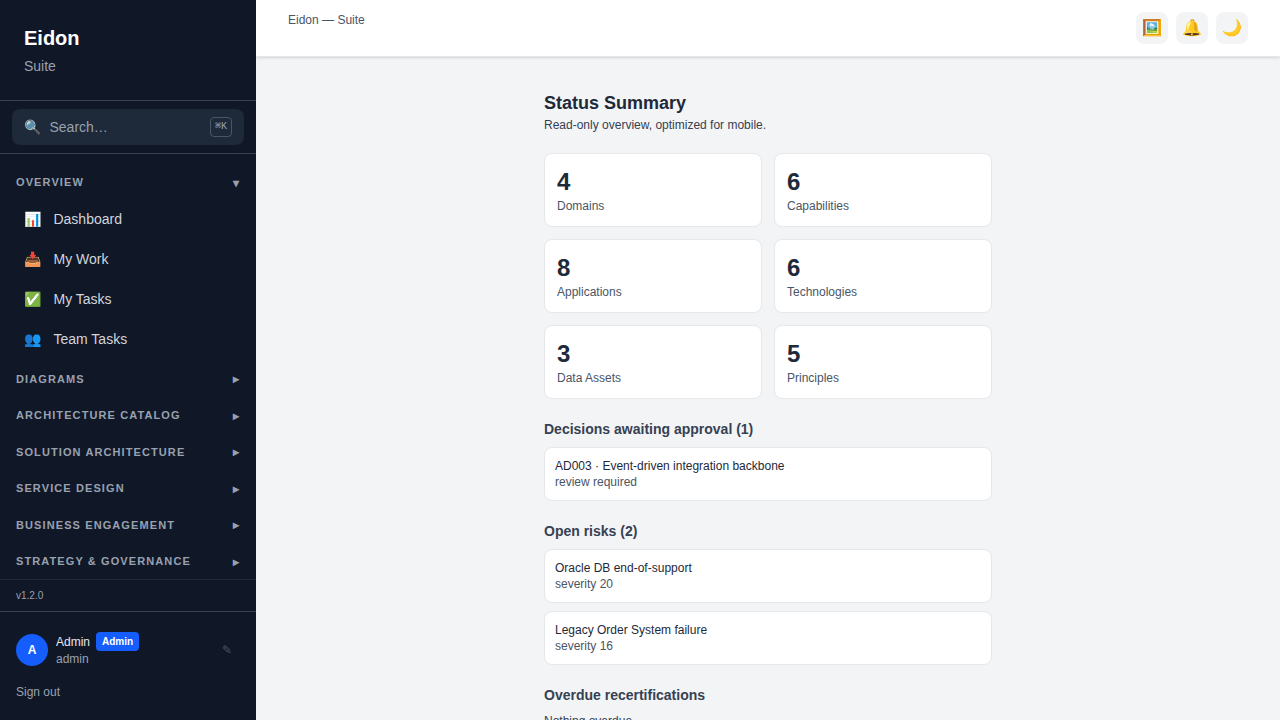
The left sidebar is grouped by discipline: Overview, Diagrams, Architecture Catalog, Solution Architecture, Service Design, Business Engagement, Strategy & Governance, Analysis, Quality & Risk, People, Reports, Tools and System. Which groups you see depends on your workspace's edition (module entitlements) and your role — a Service Design-only workspace, for example, never shows the Architecture Catalog group, since there is nothing in it to manage. Click a group heading to expand/collapse it. Use the search box at the top of the sidebar (or Cmd/Ctrl+K) to jump straight to any entity by name from anywhere in the app.
Multi-tenancy & workspaces
Eidon is multi-tenant: every account belongs to exactly one workspace, and almost all data (applications, decisions, risks, solution designs, engagements, etc.) is scoped to that workspace — you never see another tenant's records. Admins manage their workspace's name, IP allowlist, branding and custom domain from Settings → Workspace, and can export or permanently delete the entire tenant from there too. Workspace signup is disabled by default and only available on deployments that explicitly enable it; when enabled, a self-service signup provisions a free, "Draw"-only workspace rather than the full suite, as a deliberate upgrade path rather than a starting point.
Mobile Summary
A phone-optimised, read-only status view at /mobile-summary aimed at executives checking in on the go: entity counts, decisions awaiting approval, open risks, overdue recertifications, upcoming roadmap items, contracts renewing soon, and a recent-activity feed, each linking through to the full page. It renders a condensed single-column layout rather than the full desktop navigation, so it stays usable on a phone browser without pinch-zooming.